Communicating complexity
Represent product management, software delivery, business operations and AI within one coherent experience.
Design decision
Information architecture

PRODUCT DESIGN · SOFTWARE DELIVERY · 3D INTERACTION · 2026
A portfolio designed to demonstrate the thinking behind the work.
Rather than simply presenting projects, I wanted to build an experience that demonstrates how I approach product definition, interaction design, technical decisions and implementation. The result combines an interactive 3D character, a structured case-study system and a responsive frontend built through an AI-assisted development workflow.
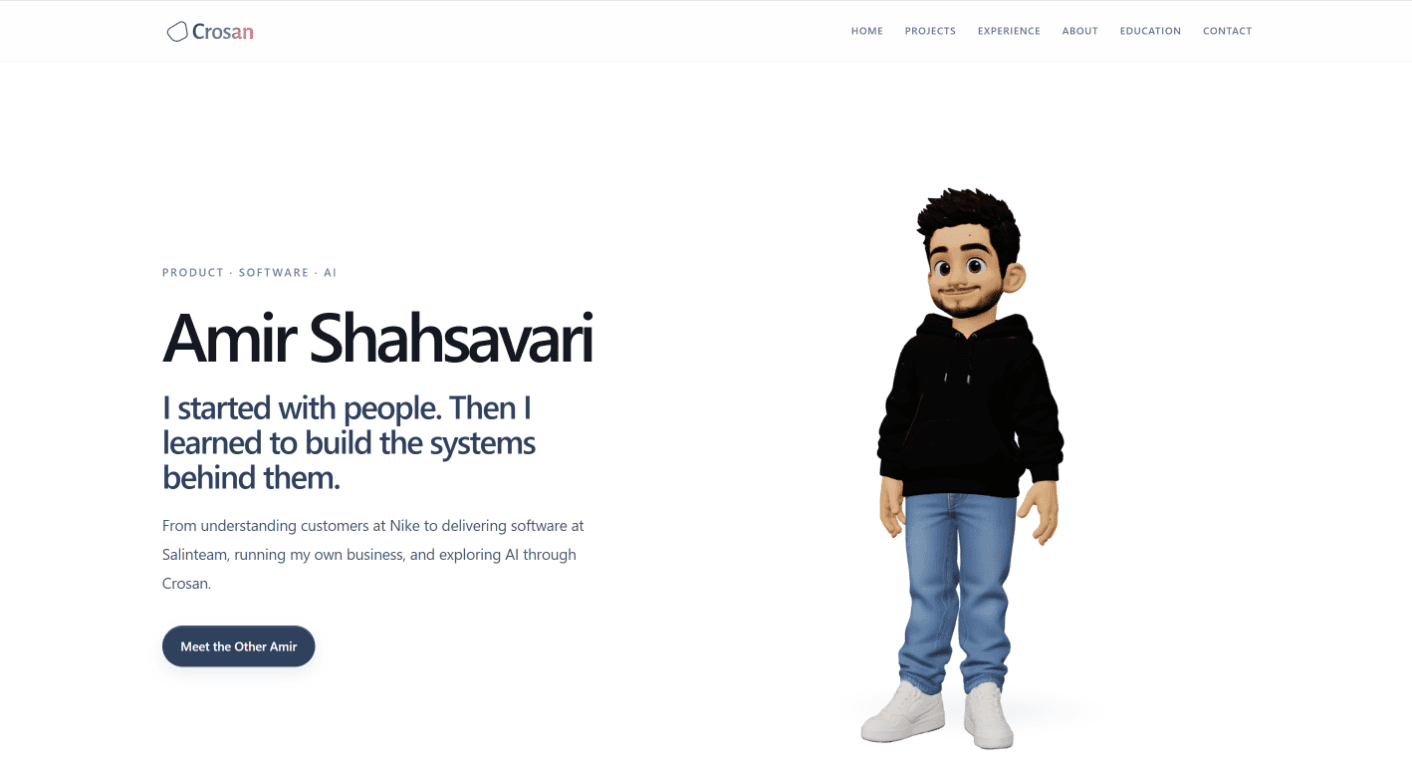
Actual homepage experience · Next.js + interactive 3D
01 / PRODUCT THINKING
Conventional portfolios communicate experience through text, screenshots and project summaries. My goal was to go beyond that and create a working product that demonstrates my decision-making.
Represent product management, software delivery, business operations and AI within one coherent experience.
Design decision
Information architecture
Make the experience memorable without allowing animation to interfere with content, navigation, accessibility or usability.
Design decision
Interaction states
Translate the concept into a responsive application with a real 3D asset, animation control, loading behaviour and testable functionality.
Design decision
Runtime boundaries
02 / PRODUCT DELIVERY
The page is the result of a staged product and delivery process. Select a stage to inspect the decision behind it.
STAGE 01
Establish the audience, information architecture, interaction behaviour, accessibility expectations and the balance between storytelling and technical credibility.
Product definition → design → asset preparation → implementation → validation
03 / SYSTEM ARCHITECTURE
A layered architecture keeps the portfolio content stable while the browser-only 3D system remains isolated, observable and recoverable.
04 / INTERACTIVE 3D
The 3D character is a product surface, not a decorative stock illustration. The repository contains a Meshy-authored textured, rigged GLB of approximately 48 MB with the original skeleton and 20 animation clips preserved. The homepage uses React Three Fiber, Three.js and Drei with controlled sequencing; `/avatar-test` exposes a separate diagnostic viewer.
~48 MB
GLB asset
20
clips preserved
R3F
rendering
/avatar-test
diagnostics
ANIMATION STATE EXPLORER
Current presentation state
Ready
Illustrative inspection of the implemented state vocabulary; the production homepage and avatar lab remain the actual 3D surfaces.
05 / ENGINEERING DECISIONS
Technical challenge: WebGL is browser-only and can destabilize server-rendered composition if mixed carelessly.
Decision: Keep the 3D hero in a dynamically loaded client component while the surrounding portfolio remains ordinary React/Next content.
Why it matters: The page can communicate even when the browser cannot start WebGL.
06 / TECHNOLOGY STACK
Next.js 16 · React · TypeScript
Three.js · React Three Fiber · Drei · GLB / glTF · animation mixer
Meshy
OpenAI Codex · prompt-based implementation and iteration
Visual Studio Code · npm · browser debugging · TypeScript · ESLint · production builds
The contribution combines product direction, requirements definition, design and AI-assisted technical implementation. The repository is the source of truth for the technologies listed here.
07 / PROBLEM SOLVING
Problem: A large rigged model can delay rendering and affect the first interaction.
Approach: A dedicated loading experience and retained surrounding content keep the page useful while the GLB resolves.
Implementation details are documented through the working homepage and separate avatar lab.
08 / QUALITY ASSURANCE
These checks describe the implemented demonstration and current validation scope. No Lighthouse score, frame rate, load-time improvement or commercial adoption claim is made.
09 / PRODUCT OUTCOME
Identify the audience, define requirements and prioritize meaningful features.
Use composition, interactions, hierarchy and animation to communicate ideas.
Work with application architecture, 3D assets, animation systems and runtime constraints.
Iterate from specifications through implementation, debugging and validation.
Use AI development tools while retaining responsibility for requirements, review and quality.
This is an implemented technical demonstration, not evidence of commercial adoption or unrelated professional engineering employment.
FINAL THOUGHT
This portfolio brings together how I think about people, products, systems and execution. Explore the experience, review the projects or connect to discuss the work behind them.